Rank: Newbie
Groups: Registered
Joined: 2/26/2024(UTC) Posts: 1 
|
Hi all,
I would like to ask, did anyone tried to put in this Sonnet SE IIIe enclosure 2 Decklink Duo 2 cards nad one Blackmagic Design Mini Monitor 4K card. My goal is to have 8in 1out configuration on laptop. Would be there any bottlenecks in this configuration?
|
|
|
|
|
|
Rank: Advanced Member
Groups: Registered
Joined: 10/20/2023(UTC) Posts: 163  Thanks: 3 times
Was thanked: 18 time(s) in 14 post(s)
|
Originally Posted by: Zorangr  Hi all,
I would like to ask, did anyone tried to put in this Sonnet SE IIIe enclosure 2 Decklink Duo 2 cards nad one Blackmagic Design Mini Monitor 4K card. My goal is to have 8in 1out configuration on laptop. Would be there any bottlenecks in this configuration? Even though the question is old,
The Sonnet Echo Express SE IIIe enclosure is equipped with the Intel JHL6540 Thunderbolt 3 controller.
Intel JHL6540 = PCIe 3.0 x4 = 32 Gbps
Therefore, after deducting the encoding payload, the actual PCIe tunnel throughput = approximately 22 Gbps = 2.75 GB/s
To have the full data bandwidth, you should not connect a display to the enclosure. (= Data Only)
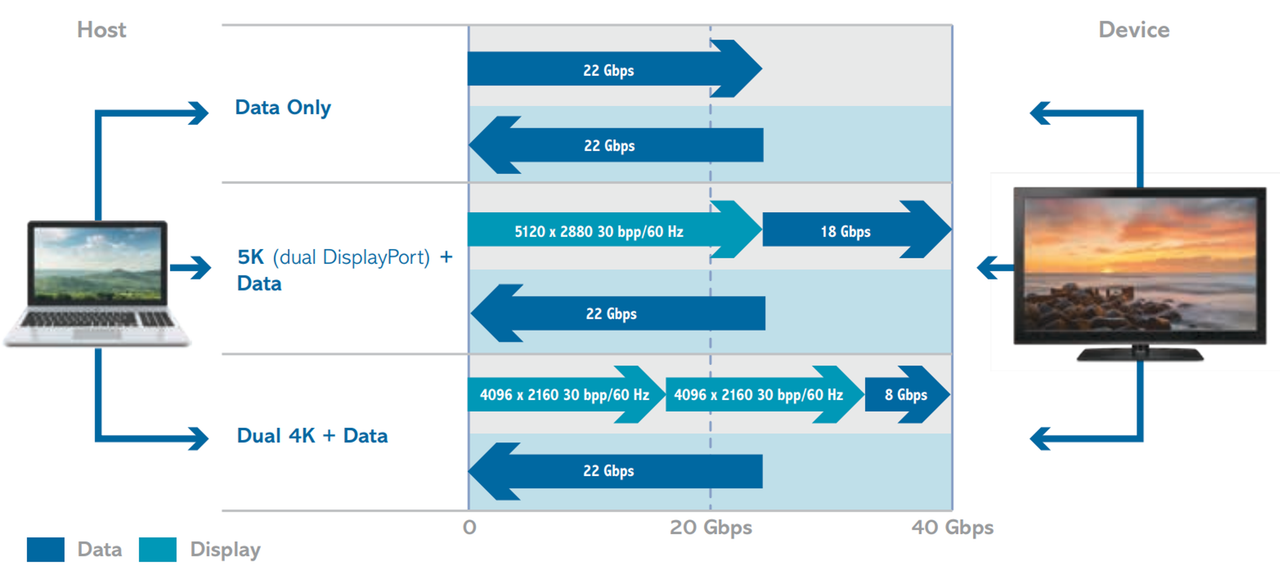
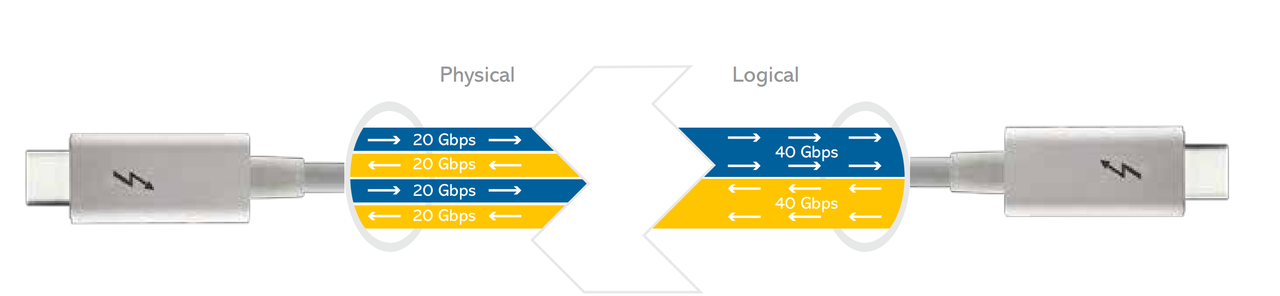
The JHL6540 Thunderbolt controller is full duplex, so it has:
2 x 20 Gbps upstream = 2.75 GB/s
2 x 20 Gbps downstream = 2.75 GB/s
That is, 2.75 GB/s in both directions simultaneously.
Behind the Intel JHL6540 controller, there is a PEX 8724 chip which handles traffic management for the 3 PCIe slots
The PEX 8724 chip supports 24 Gen 3.0 lanes:
3.0 x4 = Thunderbolt 3 interface card
3.0 x8 = PCIe slot 1
3.0 x8 = PCIe slot 2
3.0 x4 = PCIe slot 3
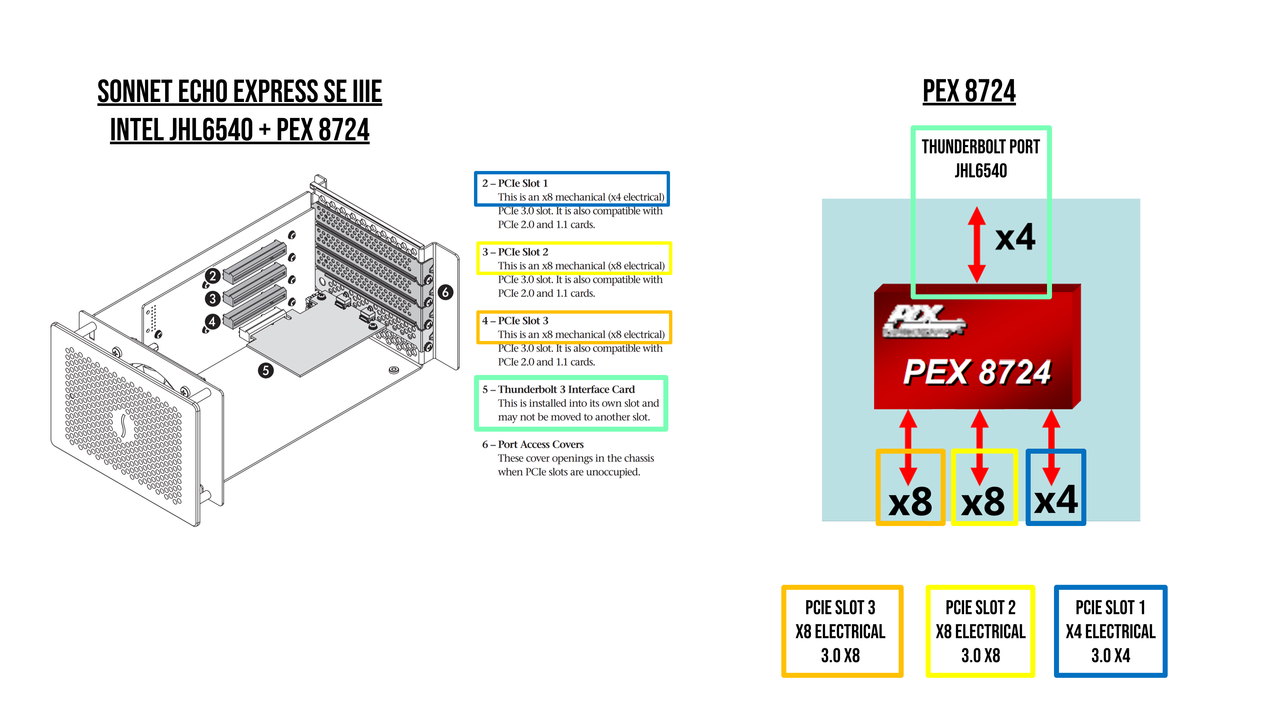
Therefore, if PEX 8724 = PCIe 3.0 x24 = 24 GB/s
It is the Thunderbolt controller that determines the limits, as the Intel JHL6540 = 2.75 GB/s full duplex
For Full HD productions, I use a Sonnet Echo Express SE IIIe
+ 2 Magewell Pro Quad HDMI for 8 x 1080p50 YUY2 inputs
+ 1 Decklink Duo 2 for 4 x 1080p50 YUY2 external outputs
1080p50 YUY2 = 208 MB/s
Therefore :
8 inputs = 8 x 208 = 1.66 GB/s (less than 2.75 GB/s) = OK
4 outputs = 4 x 208 = 832 MB/s (less than 2.75 GB/s) = OK
Everything works perfectly.
Therefore, 2 x Decklink Duo 2 + 1 x Decklink Mini Monitor 4K should not be a problem.
One last point:
For these configurations, it is best to use systems where the Thunderbolt ports are directly connected to the CPU.
Laptop: Tiger Lake-H / Alder Lake-H / Raptor Lake-H / Meteor Lake-H / Arrow Lake-H and HX
Desktop: Arrow Lake-S / AM5 (with ASM4242)Edit :
In theory, to use the Sonnet Echo Express SE IIIe to its full potential, you would need to install 3 x Decklink 8K Pro for:
6 4K25p YUY2 inputs = (415 x 6 = 2.49 GB/s TX) + 6 4K25p YUY2 outputs = (415 x 6 = 2.49 GB/s RX)
If anyone has already tested this, your feedback would be appreciated.
|
|
|
|
|
|
Forum Jump
You cannot post new topics in this forum.
You cannot reply to topics in this forum.
You cannot delete your posts in this forum.
You cannot edit your posts in this forum.
You cannot create polls in this forum.
You cannot vote in polls in this forum.
Important Information:
The vMix Forums uses cookies. By continuing to browse this site, you are agreeing to our use of cookies.
More Details
Close