vMix Forums
»
General
»
Feature Requests
»
Remove limits on vMix UI resizing
Rank: Advanced Member
Groups: Registered
Joined: 8/15/2013(UTC) Posts: 107   Location: Could be Australia could be Europe/UK! Thanks: 2 times
Was thanked: 9 time(s) in 9 post(s)
|
Running vMix UI on a 1920 x 1080 screen is a bit of a pain. We often do solo corporate productions or sport with a single laptop or screen, there seems to be a limit to how small we can make the program and preview windows. I do not understand why there is a limit and request it be removed. In the default sizing on a 1920 x 1080 screen I can only see one line of inputs. It is impossible to see any replay events without undocking the replay window and then having to switch between everything. as seen here: 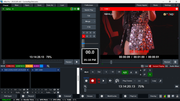 I have noticed on my 2k laptop display that I can make the preview and program windows much smaller, making much more real-estate at the bottom of the screen to see replay events or more inputs/ audio faders etc. Similar to this: 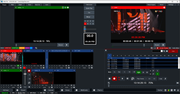 My request is that we be given the power to reduce the size of the preview/ program window as we see fit to allow flexibility for different production scenarios.
|
|
|
|
|
|
Rank: Administration
Groups: Administrators
Joined: 1/13/2010(UTC) Posts: 5,350 Location: Gold Coast, Australia Was thanked: 4759 time(s) in 1633 post(s)
|
|
 1 user thanked admin for this useful post.
|
|
|
|
Rank: Advanced Member
Groups: Registered
Joined: 9/7/2024(UTC) Posts: 63  Location: The Great PNW Was thanked: 10 time(s) in 9 post(s)
|
I think the better request would be to stop requiring hard resize sizing... allow dynamic resizing and do not snap to predetermined heights. Same for input preview sizing... allow any value...
|
|
|
|
|
|
Rank: Advanced Member
Groups: Registered
Joined: 8/15/2013(UTC) Posts: 107 Location: Could be Australia could be Europe/UK! Thanks: 2 times
Was thanked: 9 time(s) in 9 post(s)
|
Originally Posted by: admin  I didn't have a 1920 x 1080 (only 1920 x 1200) display connected so I was trying to fake it for the screen shots. Display scaling is set to 100%. In any case I would love to be able to move the line below the preview/ program up further than it will currently let me. If I want the Preview and Program the size of a postage stamp for some scenarios (eg using a Multiview to switch from) that would be great! I realised I can set the 1920 x 1200 to 1920x1080 to show you (Scalling set to 100%) 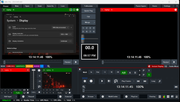 As you can see the Replay part is unusable, the UI will not let me shrink the Preview/ Program any more than this. Ironically if I reduce the width of the UI it will shrink the preview/ program smaller and give me some more vertical room. Ideally It would be great to free move the UI to anything I like. Small preview, large program kind of like how video editing software lets you move things around, But I would take being able to move the line higher.
|
|
|
|
|
|
vMix Forums
»
General
»
Feature Requests
»
Remove limits on vMix UI resizing
Forum Jump
You cannot post new topics in this forum.
You cannot reply to topics in this forum.
You cannot delete your posts in this forum.
You cannot edit your posts in this forum.
You cannot create polls in this forum.
You cannot vote in polls in this forum.
Important Information:
The vMix Forums uses cookies. By continuing to browse this site, you are agreeing to our use of cookies.
More Details
Close
