Rank: Newbie
Groups: Registered
Joined: 3/6/2025(UTC) Posts: 3  Location: Buenos Aires Thanks: 2 times
|
Hi everyone, I'd like to share a tool I've been building for my own productions and have now published for anyone who writes vMix scripts: Scripting Assistant - For vMix, a free extension for Visual Studio Code. This is an unofficial community project. It is not affiliated with, endorsed by or supported by vMix or StudioCoast Pty Ltd.One-minute demoWhy I built itEvery automation call in a script is a set of plain strings: Code:API.Function("SetText", Input:="Score vMix", SelectedName:="txtHome.Text", Value:="3")
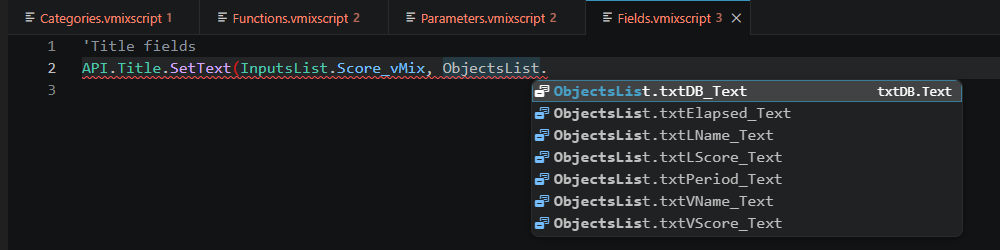
A typo in the function name, a renamed input or a title field that no longer exists doesn't show up until the script runs during the show. The built-in script editor doesn't check any of it, so I wanted something closer to what Visual Studio gives you for VB.NET. With the extension you write the same call in a typed form, with completion at every step: Code:API.Title.SetText(InputsList.Score_vMix, ObjectsList.txtHome_Text, "3")
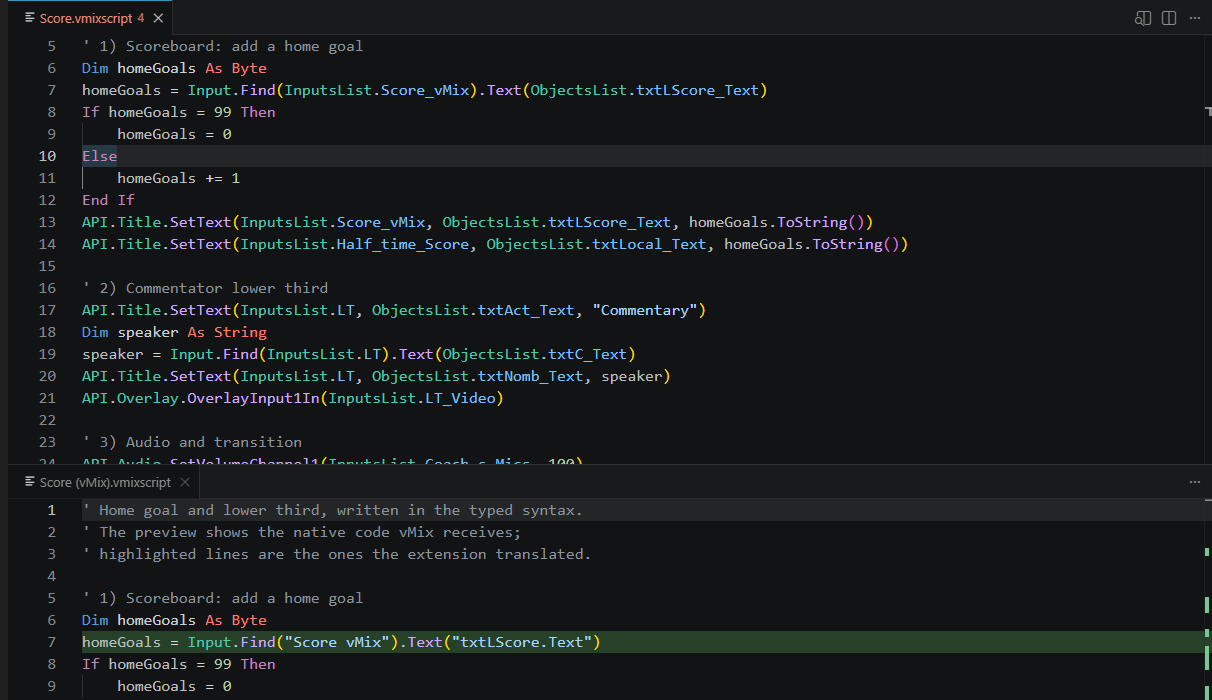
and it is translated back to the exact API.Function line above when you export. What it does
- Reads your real .vmix project: inputs, the text and image fields of every GT title (straight from the .gtzip), data sources and the scripts stored in the project.
- IntelliSense built from that project: categories, functions with their overloads, parameters and value ranges. Inside SetText you only get title inputs, and only the text fields of the input you picked.
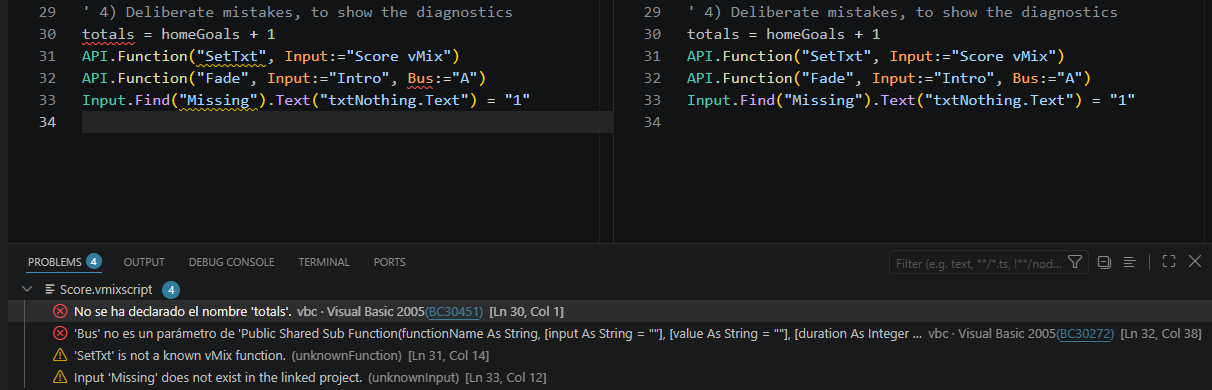
- Real compiler errors: the script is compiled in the background with vbc.exe, the same .NET Framework VB compiler vMix uses, so you see undeclared variables, misspelled members and unclosed blocks before you paste the script into vMix. It uses the namespaces vMix imports, so an unqualified List(Of String) is reported just as vMix reports it.
- Quick fixes: "Did you mean SetText?", generate a missing Dim with its type inferred, remove an argument API.Function doesn't accept, or pick the closest existing input or title field.
- Live preview: a split view showing the script exactly as vMix will receive it, updated as you type.
- Import and export: import any script from the project, and export back to the clipboard or straight into the .vmix file (only the scripting section is touched, with a backup first).
- Visual Studio-style editing: pretty listing, automatic End If / Next / End Select, rename (F2), go to definition (F12), format document (Ctrl+K Ctrl+D) and Surround With (Ctrl+K Ctrl+S).
- Native scripts work too: if you write API.Function("...") directly, you still get input, function and field completion inside the strings, plus XPath completion for API.XML().
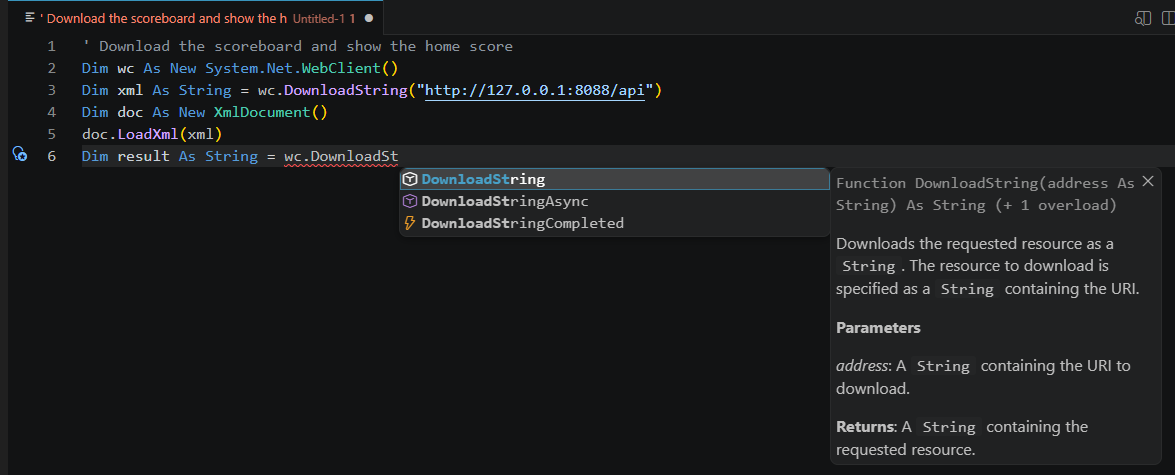
- .NET classes with Quick Info: after As or New you get types, and after a dot the real members of the .NET Framework 2.0 classes vMix scripts use (WebClient, XmlDocument, File, DateTime, Regex, List(Of T)...), with the description Visual Studio shows as Quick Info, every overload in signature help and the same description on hover.
- Function list kept current: it checks the published vMix Shortcut Function Reference and offers to update when new functions appear.
- English, Spanish and Portuguese: the extension follows your Windows display language, and the .NET descriptions appear in Spanish or Portuguese when the .NET Framework IntelliSense files for that language are installed.
    Supported .NET namespaces Supported .NET namespacesImported by vMix, usable without qualification: System, System.IO, System.Net, System.Diagnostics and System.Xml. Written qualified: System.Collections.Generic, System.Collections, System.Text, System.Text.RegularExpressions, System.Net.Sockets, System.Threading and System.Globalization. vMix's documentation doesn't list exactly which classes work, so this list comes from the vMix help, the forum and public vMix scripts. Something may be missing or included unnecessarily: if a class works in your scripts and isn't offered, or something listed doesn't work in vMix, please tell me here or in the Q & A on the Marketplace page. Everything the extension generates stays within VB.NET 2.0, running inside the single Sub that vMix compiles, so there are no Sub or Function declarations and nothing newer than Visual Basic 2005. I tested it against a real handball production with 48 inputs and 56 scripts: every script imports and exports back without losing anything. Getting started
- Install Scripting Assistant - For vMix from the VS Code Extensions view, or from the Marketplace: https://marketplace.visu...pting-assistant-for-vmix
- Click the vMix item in the status bar and choose Open project to link your .vmix file.
- Create a new file with File > New File > vMix Script File and start typing API.
Requirements: Windows (for the compiler check), VS Code 1.80 or later, compatible with vMix 29. FeedbackBug reports and suggestions are very welcome, especially about specific vMix functions (a wrong parameter, a missing overload, an incorrect value range). You can reply here or use the Q & A tab on the Marketplace page. Thanks, and I hope it saves you some time on your next show. Sergio
|
